Architecture intelligence
Import graphs, cycles, hubs and a transparent health score across JavaScript, Python, Go, Rust, Java, .NET and more.
maverick graph --format mermaidRead documentation
An open-source project by Jhones Gonçalves
Your AI agent writes the code. Maverick makes it mergeable. Turn an idea into a grounded plan, a task graph and verifiable evidence — with a human decision before merge.
0.
Telemetry
9.
AI tools supported
11+.
Language stacks
3.
Workflow levels
BEYOND THE DIFF
A fast diff is not enough. Maverick connects intent, scope, architecture and evidence so your team can answer what changed, why it changed and how it was verified. Built for real repositories, not disposable demos.
Import graphs, cycles, hubs and a transparent health score across JavaScript, Python, Go, Rust, Java, .NET and more.
maverick graph --format mermaidRead documentationExplore decorators, routers and file-based routes. Inspect guards and find write endpoints that lack protection.
maverick routes --kind httpRead documentationIdentify transitive dependents, affected entry points and relevant tests before touching the code.
maverick impact src/services/orders.jsRead documentationRun agents with trust lists, permission ceilings and a model per step. Automation with explicit boundaries.
maverick agent run my-taskRead documentationTyped gates, iteration caps and no-progress windows. Every run ends in done, revise or awaiting approval.
maverick flow run ship my-taskRead documentationInstall skills, agents, commands and MCP servers across AI tools, with a lockfile, content hashes and a dry-run plan.
maverick add reviewer maverick-review --dry-runRead documentationINTENT → EVIDENCE → REVIEW
Three workflows, one pipeline. Maverick selects a starting workflow based on the idea — from everyday changes to critical systems.
Features, fixes & refactors
The core pipeline: understand the change, design against the real repository, build, verify and review before preparing the PR.
RECORDED ARTIFACTS
PRD.md · TECHSPEC.md · subtasks/ · EVIDENCE.md · REVIEW.md · PR-DRAFT.md
Maverick prepares the PR. It never merges. Accountability stays with the engineer.
Read the workflowMAVERICK LENS
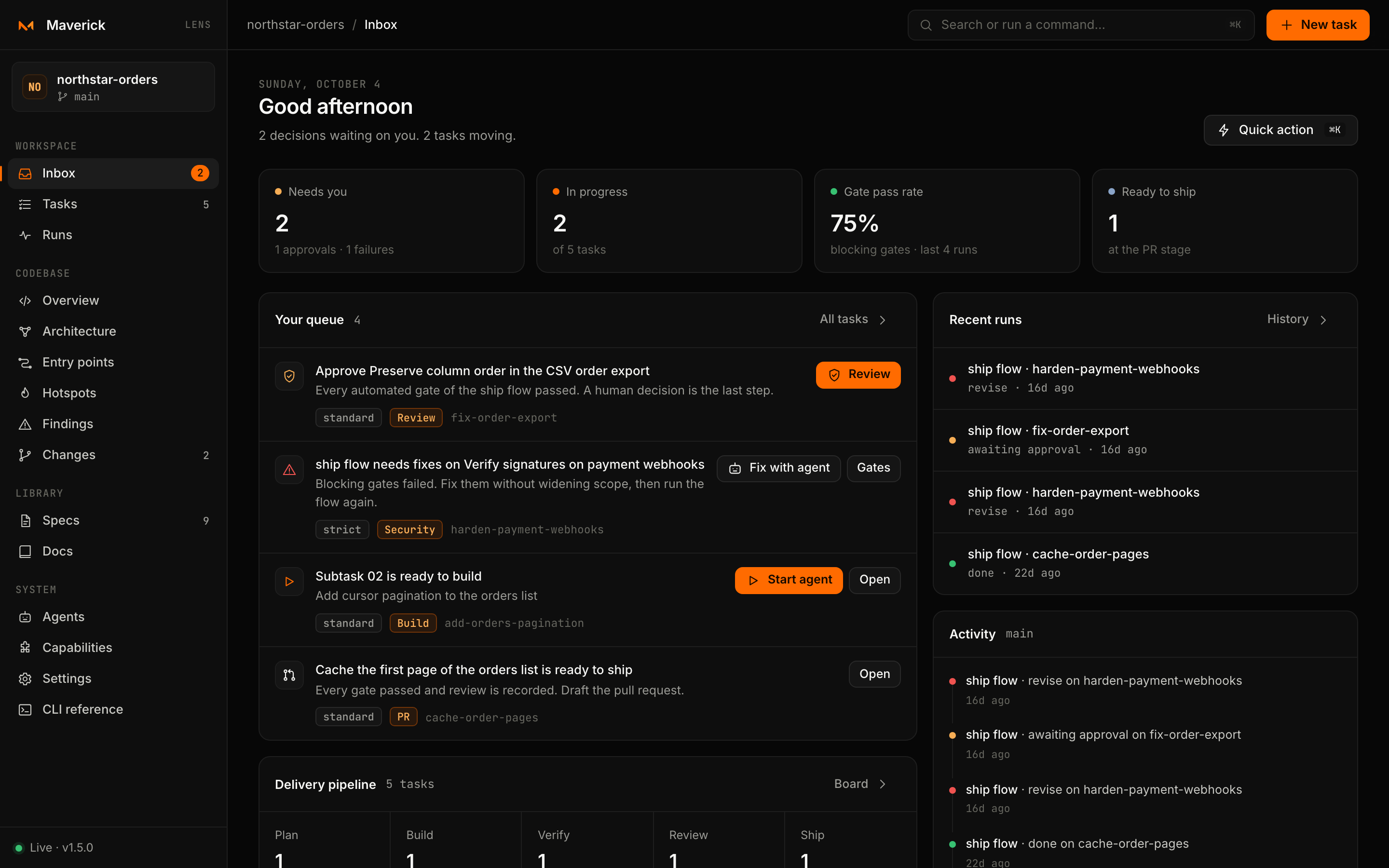
A local cockpit for tasks, evidence and architecture. The actual project workspace, not a mockup.
Pending approvals, failing gates and ready subtasks — with the next action beside each one.
QUICK START
Node.js 20+ · An existing repository · Your preferred AI tool
Run inside your project. Maverick interviews the repository and prepares shared skills for your AI tools.
npx @maverick-ai/cli initCreate a task grounded in your code. Maverick selects a workflow and opens the agent at the planning stage.
npx @maverick-ai/cli new "Add cursor pagination to the orders endpoint"Inspect tasks, gates, evidence and architecture in a workspace running on your own machine.
npx @maverick-ai/cli lens --openPrefer a global install? npm install --global @maverick-ai/cli
BUILT IN THE OPEN

Jhones Gonçalves
Staff Software Engineer · Software Architect
Maverick AI is where my work with architecture, developer experience and AI-assisted engineering becomes a reusable tool. The code and documentation are public: inspect the decisions, try it in your own repository and bring real feedback.
Code: MIT · Documentation and content: CC BY-NC 4.0
PROJECT LINKS
Installation, concepts and your first task.
GitHub Pages
Explore the code, examples and project history.
GitHub
Install @maverick-ai/cli and check published versions.
npm
Commands, options, agents and flows.
CLI
Report a bug or discuss an improvement.
GitHub Issues
Follow releases and changes to the project.
GitHub Releases
FAQ